Posts

My photography workflow 2020

Image
Setting up a "workflow" or an organisation to your work, is a key part of moving from a beginner to immediate kill and above. So a bit about my photography workflow since I am slowly retiring my old Mac Mini and OSX Snow Leopard and moving to an old Windows 10 desktop. Just before COVID-19 turned the world upside down I had also got a new camera not supported by any of the RAW converters I was using.  Shooting For my veteran Canon 450D I have a couple of styles setup from Cinescopophilia shooting RAW + JPEG. I have in the past sometimes shot RAW only, but it was a pain if software didn't support it. But now even my phone can process the CR2 RAW files! On my X100 and X-T100 mirrorless cameras I have started to try and follow the tips from In Camera: Perfect Pictures Straight Out of the Camera by Gordon Laing  with general settings from  Fredrik Averpil and Film simulation settings on Fuji Weekly The X100 is also another veteran now, but being a premium camera when...
Using RStudio with a Chromebook

Given my interest in using R as an analysis tool and using a Chromebook as my main laptop at home and on side projects for 2 years, thought I'd take a quick  look at some options for combining the two. Option 1 - Using RStudio on AWS This has been my main usage of R at home, using RStudio on Windows 10 at work. With a couple of preset images created it's easy to get up and running. I used the image created by  Louis Aslett . There are a few alternatives around now, even the Amazon have an article that goes into a bit more depth on  Running R on AWS . THis allows you to fine tune what is setup. I have been using this for about a year now and the experience is so seamless on a Chromebook, since everything else is also running as a Chrome app. Pros:  Use computing power in the cloud, can easily share Consistent experience no matter the computer you use to access it Cons:  AWS management consoles do have a learning curve Small monthly charge for s...

MEETUP: Discovery is a mindset not a stage - creating a learning organisation at ProductTank Brighton

Image
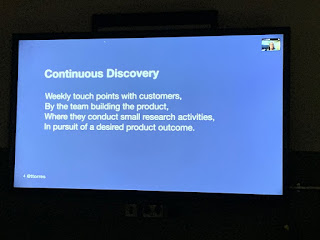
Last night was the latest installment of ProductTank in Brighton . We were lucky to have an overview of continuous discovery from Teresa Torres. She started off by discussing how discovery and delivery should be more intertwined and not separate phases - this can be a problem with “dual track” as it can be impression it gives. She then asked " Continuous discovery ... are you really doing it like this?" Or is it research with a project mindset? Getting better week after week The question to guide setting up product discovery is “How do we get better week over week” We make product decisions every day, so if we want to be truly customer centric then we need to engage with our customers every week so that our decisions are infused with their input. Need to avoid cognitive bias because we are thinking about product all day every day, check the decisions with what our customers expect.  Shooting here for co-creating with a product mindset. Otherwise you...

Adventures with flow and transparency

Image
Photo by  Sasha • Stories  on  Unsplash This is a follow up to my post on roadmaps and themes . I wanted to talk about experience in a B2B context with a platform product and SaaS-style model a bit more. Most articles out there tend to be from B2C or app products. So about the time I wrote about theme based roadmaps, I was using a combination of spreadsheets, Trello, and JIRA ... all OK for their intended purpose, but all have limitations around use and structure for product people.  Limitations that possibly are blockers in increasing flow and transparency in the product development process. S o, why are flow and transparency important? I think this tweet by John Cutler sums it up PM tip: Help foster an environment where great/better decisions are made...not where you are the decider.  #prodmgmt   #ux   #design — John Cutler (@johncutlefish)  October 4, 2018 The flow aspect allows feedback and course alteration as n...

Returning to code, worth it for a Product Manager?

Image
The past couple of weeks have given me opportunities to reflect on what I like about my job and previous experience. Partly because we are expanding the team at 15below , partly from doing a bit of coding. I have written a bit about becoming "post-technical"  in the past, but now is the first time I have done much code in years. The thing that I enjoy most is solving problems and helping people. Throughout my career solving business problems to help create positive outcomes has always been fulfilling. Now I get to help do that, then go back and refine the solutions. You don't always get to do that as a developer or in a project focused role. Side project Code wot I wrote The first bit of coding is on my side project . Martyn has created a great architecture and I contributed the project import from LinkedIn ( almost) all by myself. It feels to brilliant to code on a side project - you get a sense of achievement from seeing an idea come to life. It also provides...

Further adventures in SEO land: Organic search for side projects and startups

Image
This is  part of a series  about my side project  Bashfully , which aims to give graduates and other new entrants to careers a seasoned professional level way of expressing themselves through the super power of story telling. Following the core principles of being discoverable, personalised and guiding in approach. I have already written about Venturing into the world of SEO where I setup the infrastructure on the site, like metadata and adding a sitemap. Then a little later When SEO meets the MVP process on Bashfully , where I revisited how search results appear and what I hoped for Bashfully. Photo by  Annie Spratt  on  Unsplash This has been the hardest part of the project so far. As much as you can setup the structure and hint to search engines, if people aren't finding your site organically then they're unlikely to find it. So, how to get organic searches ? Taking a look in the search consoles the closest searches that appeared we...

Creating a ProdPad progress report in R

Image
Photo by  rawpixel  on  Unsplash My journey with writing new R scripts had taken a bit of break recently. It started with exploring Text-mining. Then creating my library of reports for Product Management . Although R takes a bit of getting used to, it is like Excel x100 once you do. It is great for repeatable analysis and report generation. Saving a lot of the hassle of the export, format, and save cycle that I was going through. The problem When I needed a new report though I took the chance to expand my skills. I wanted an automated report that showed progress in the product process. This was to show the pipeline to meet strategic goals in the product ideas worked on. This should be in a suitable format to share with senior management. An be understandable especially to those outside the Product team. The solution I had been manually noting figures from the ProdPad UI when I remembered that there was an API. I took a look and it is a nice RESTful API ...